


Final Cut Express is the relatively inexpensive consumer version of a professional video editng suite. FCE gives you the capability to synchronize images and sound, add special effects, and export projects as standalone videos in a variety of formats. And Final Cut Express accepts video: MOV (*.MOV), DV Format (*.DV) and MPEG-4 Movie (*.MP4).
Would you like to import video into FCE but your video is not accepted by Final Cut Express? FCE Converter will remove the FCE compatible video formats problem so that you can import any video into FCE by converting video to FCE supported video. And Final Cut Express converter can convert video from FCE to other formats after export video from FCE. For example, you can convert Final Cut Express video to MP4 for your iPhone, if you wan to transfer the FCE video into iPhone to take away for enjoying.
With user-friendly interface, FCE video covnerter can do video to FCE conversion or FCE to video in a few mouse clicks.
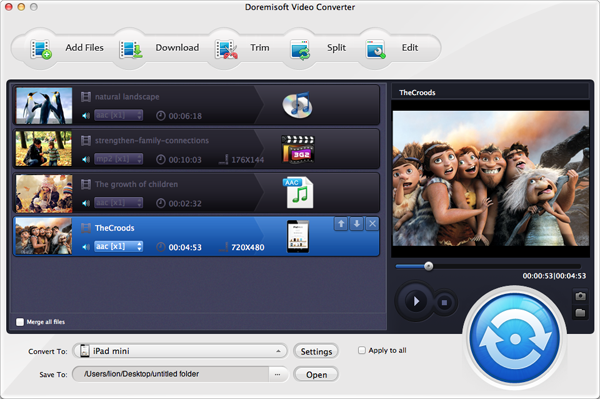
Launch the FCE Converter and click the "Add File" button to browse the directory to load videos.
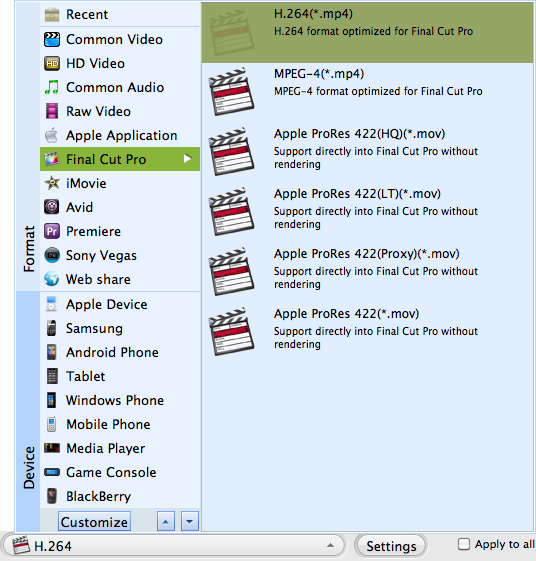
Click the triangle icon next to the profile field. In the Profile list, choose a right format as the output format for FCE
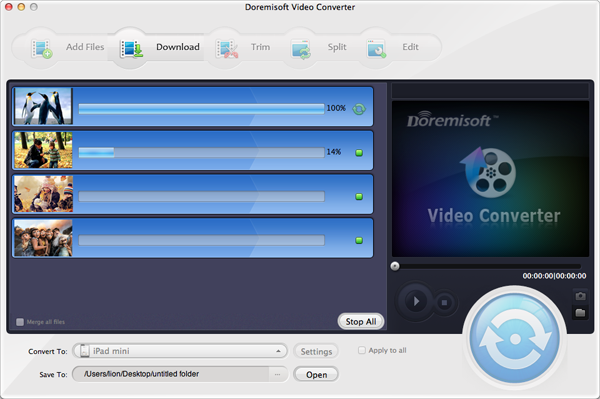
Click the "Start" button to start converting video to FCE. By default, the output folder will be opened after the conversion so you can easily locate the converted files. You can also choose to shut down your computer after conversion.

Browser compatibility : IE/Firefox/Chrome/Opera/Safari/Maxthon/Netscape
Copyright © 2009-2015 Doremisoft Software Co., Ltd. All Rights Reserved
 Download
 Download