


BlackBerry PlayBook is a feature-rich tablet and runs on a new operating system which offers great user experience. This tablet is good for people who want to browse the internet, check emails, want to play music or videos. We are glad that BlackBerry PlayBook can support many popular formats including: AVI, 3GP,3GP2,M4A, M4V,MOV, MP4, MPEG-4,ASF,WMV,WMA.
But other some most popular MKV, VOB, MPEG are beyond its allowing, to play these normal formats on 7 inch display with 600X1024 pixels is really an awful thing. And the best resolution for it should be 720p, as we know that it indeed support High profile,720p (1280 x 720). But for 1080p only occurs when output to a HD television, with a HDMI cable has a resolution of 1080p (1920 x 1080).
Step 1: Load your target HD MKV/VOB/MPEG video to the program by clicking Add File button.
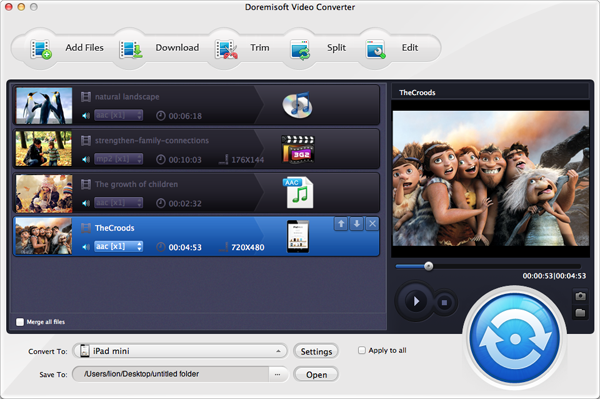
Step 2: Choose BlackBerry option and HD option as main category and to choose the format you need.
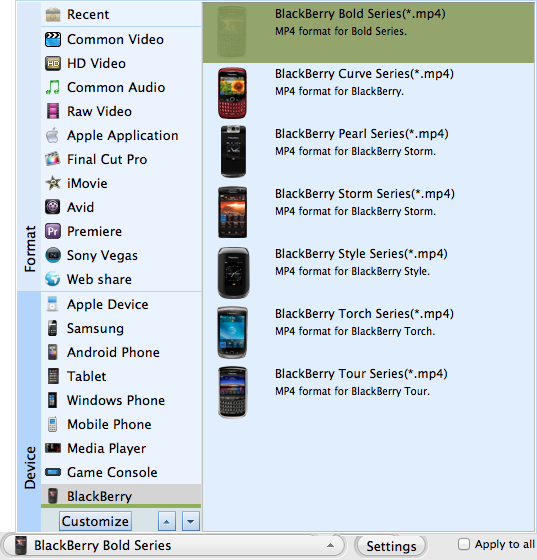
Tips: Recommended video format for local playback on the BlackBerry PlayBook tablet File from BlackBerry official site: MP4 format Video: H.264 Audio: AAC
Step 3: Right click Start button to begin your MKV/VOB/MPEG to BlackBerry PlayBook conversion.
Browser compatibility : IE/Firefox/Chrome/Opera/Safari/Maxthon/Netscape
Copyright © 2009-2015 Doremisoft Software Co., Ltd. All Rights Reserved
 Download
 Download