


Apple advises its iPhone 4S as the most amazing iPhone yet. Its highlights can be summarized as Dual-core A5 chip. All-new 8MP camera and optics. iOS 5 and iCloud 1080p video playing support.
Let alone no design overhaul, just from media prospect, 4S presented operated OS are supporting a good video and audio playing platform: 1080p video playing back-up, H.264 video up to 1080p, 30 frames per second; MPEG-4 video up to 2.5 Mbps, 640 by 480 pixels; Motion JPEG (M-JPEG) up to 35 Mbps, 1280 by 720 pixels. Only if you want play video on iPhone 4S, you will need an iPhone 4S video Converter.
Mac iPhone 4S video Converter is an all-in-one video to iPhone 4S Converter for Mac users. With it, you can convert HD videos including MKV, MOD, AVCHD MTS, M2TS, TOD, HD MPEG-4 SD videos such as MP4, WMV, AVI, MOV, MPEG-1, MPEG-2 etc. to iPhone 4S supported formats for best replaying on its Retina display.
Import common videos to iPhone 4S video Converter from your PC HD drive.
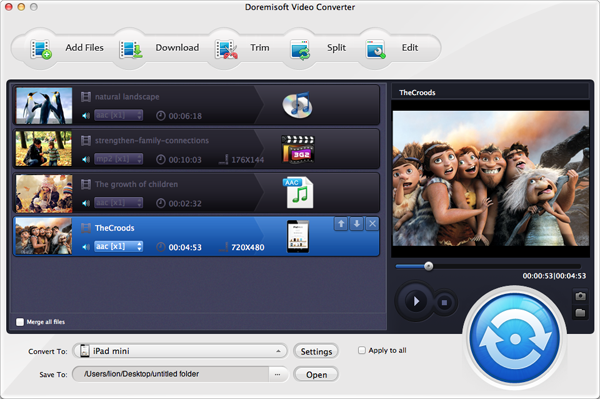
Set iPhone 4S supported format as output.
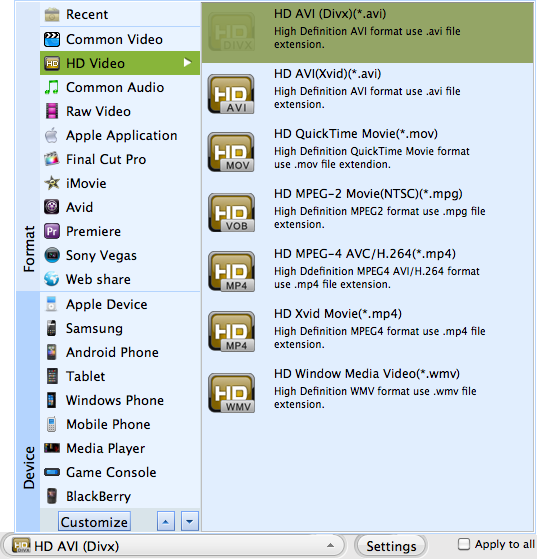
You have three choice:
Go to HD option------Set H.264 1080p
Go to iPhone option------Set MP4 720p or MPEG 480p
Click "Start" button to begin video to iPhone 4S Conversion.

Browser compatibility : IE/Firefox/Chrome/Opera/Safari/Maxthon/Netscape
Copyright © 2009-2015 Doremisoft Software Co., Ltd. All Rights Reserved
 Download
 Download