


Want to watch movies on Samsung Galaxy Tablet anytime and anywhere? But confused videos like YouTube FLV are not supported by Galaxy Tablet. Here I highly recommend FLV to Samsung Galaxy Tab converter for mac.
Best YouTube to Samsung Galaxy Tab converter mac is a must-have for Galaxy Tablet owner, it's a troubleshooter when you can't play YouTube video file on it, or you wish to convert FLV to Samsung Galaxy Tablet format, that's what the best Samsung Galaxy Tablet for mac supposed to do at this point.
The program can convert FLV to Samsung Galaxy Tablet supported format MP4, convert FLV to Samsung Galaxy Tab on mac, it's also a YouTube Video editor as well that can trim, clip, crop, merge and apply special effects to FLV video.
FLV to Samsung Galaxy Tab converter for mac downloads is now available on Mac OS Lion, Mac 10.7, Mac 10.6, Mac Snow Leopard, Tiger, Mac 10.5 etc. below is the step by step guide on how to convert YouTube FLV to Samsung Galaxy Tablet on Mac OS.
Step1: Download and install YouTube to Samsung Galaxy Tab converter mac and Click "Add File" on the top panel to add the FLV video(s) you want to convert. Click the small right arrow to preview the imported video.
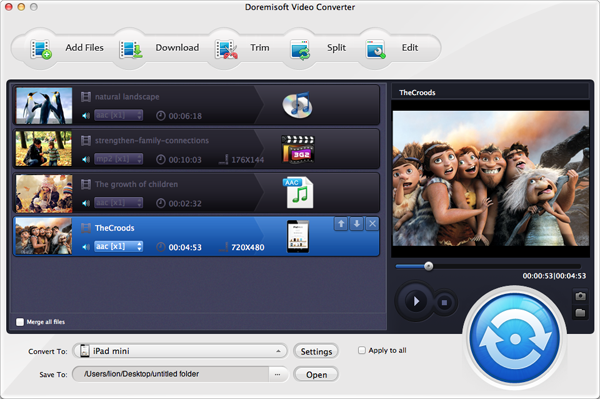
Step2: Select the output format in the drop-down list, when click the "Profile" button, Move the mouse to Common Video and save as "MP4", Click the drop-down menu list next to "Destination" field to select the folder to save the converted FLV video footage.
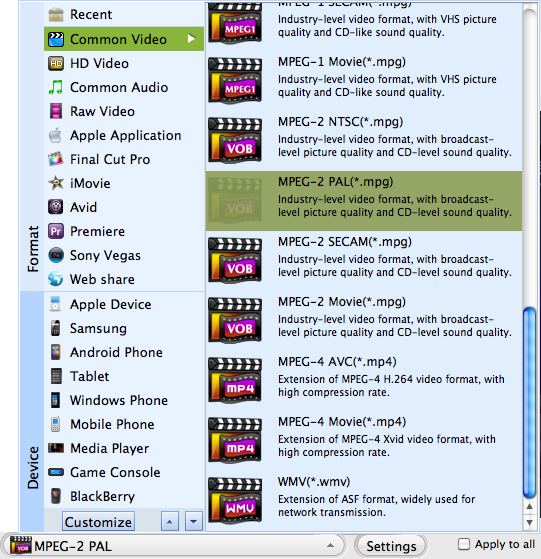
Step3: Go to the final step-Hit "Start" to begin to convert FLV to Samsung Galaxy Tab on mac with fast conversion speed.
Browser compatibility : IE/Firefox/Chrome/Opera/Safari/Maxthon/Netscape
Copyright © 2009-2015 Doremisoft Software Co., Ltd. All Rights Reserved
 Download
 Download