


A 1.2 Ghz dual core processor, a 1GB RAM and Android's 2.3.5 Gingerbread operating system imbue the Motorola Droid RAZR with some serious power and processing capabilities. It has lots of goodies that will make even veteran mobile phone users drool.
See its excellent display to support 1080p video playing:
It's not the biggest display, particularly when you look at the Droid Razr Prime, but it's still more than enough at 4.3-inches. With 540x960 Super AMOLED Advanced to support
Audio: AAC, AAC+, AAC+ Enhanced, AMR NB, AMR WB, MIDI, MP3, WAV v10, WMA v9
Video: Capture/Playback/Streaming, HD Video, H.263, H.264, MPEG4, WMV
In order to play all kinds of videos like AVI, M2TS, MPEG, TOD, 3GP, MKV, VOB, MOV, DivX, Xvid etc. SD videos to Motorola Droid Razr H.264, Mp4, WMV with perfect quality for 1080p Full HD or Start Definition playing on its 4.3 inch display. We need the help of Video to Droid Razr Converter (Win7 include) . Following is detail on video to Droid Razr converting:
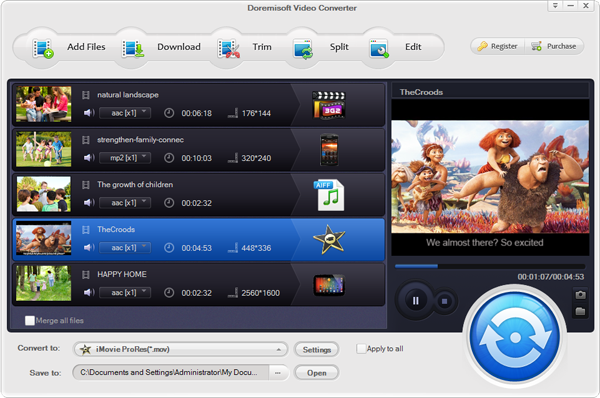
Step 1: Click "Add File" to add videos like AVI/MKV/M2TS/VOB/DV/MOV/M4V from your PC Hard Drive to the program.
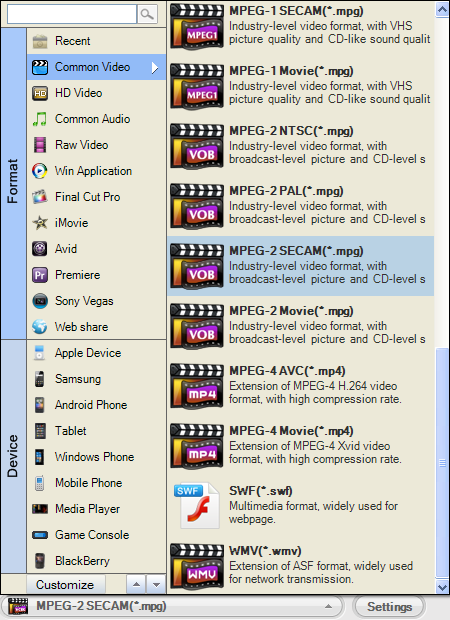
Step 2: Set Droid Razr H.264 (MP4) format.
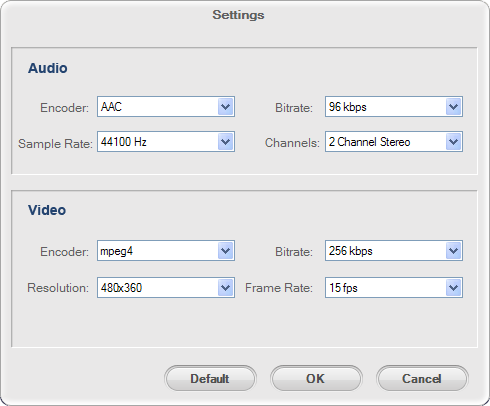
Tips: The recommend resolution is 1080p for H.264. Mp4 See the screen bellow:
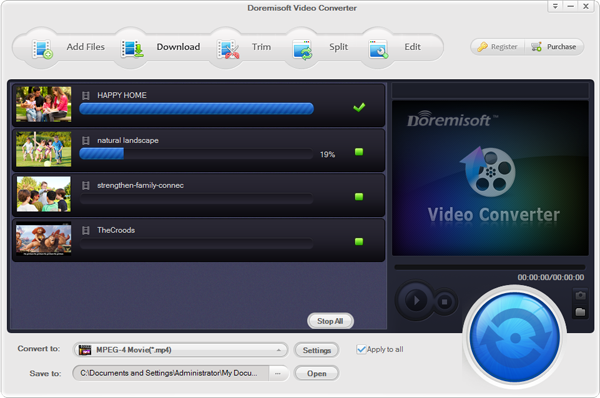
Step 3: Click "Start" button to begin convert common video to Droid Razr MP4.
Related: Convert DVD files to Motorala Xoom on Mac Lion
Browser compatibility : IE/Firefox/Chrome/Opera/Safari/Maxthon/Netscape
Copyright © 2009-2015 Doremisoft Software Co., Ltd. All Rights Reserved
 Download
 Download