


RM is the short title of RealMedia which is a proprietary multimedia container format created by RealNetworks. It is typically used in conjunction with RealVideo and RealAudio and is used for streaming content over the Internet.
We appreciate it much because it's featured these advantages:
-Small in size while keep good image and video quality;
-Suitable for online playing;
-Players support it including RealPlayer and RealOnePlayer.
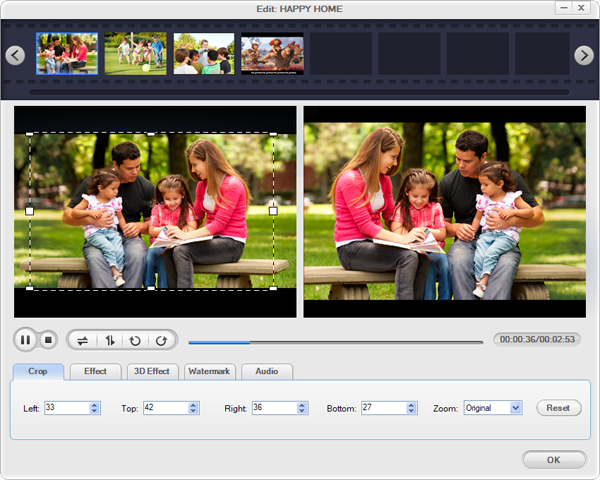
Doremisoft M2TS to RM Converter can do a good job to convert M2TS files from AVCHD camcorders to common RM for better playing online and broadcasting to networking. Before converting you can have a good edit to perfect the original file like clip the length M2TS part, crop the unwanted black edges and edit the special effect.
Save the AVCHD M2TS file from your HD video camera to your computer. Then install and run M2TS Video Converter.
Click the "Add Files" button to browse your computer hard drive and load the M2TS video files you want to convert to the program.
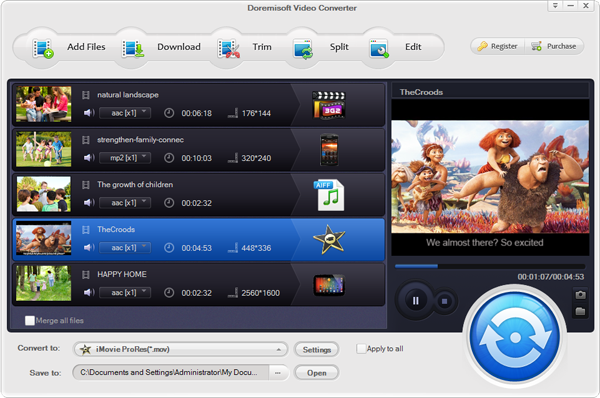
Footages shot by some camcorders are easy to have juggled edges and ghosting occurs when you preview the M2TS files. So crop the unwanted edges here.
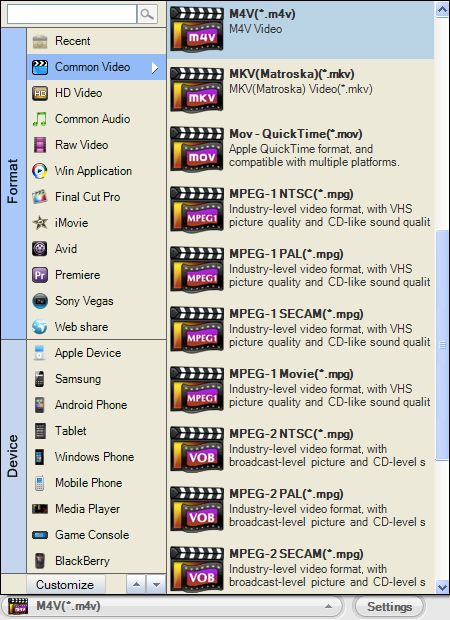
See the small arrow cursor on "Profile"? Then go to "Common Video"->"RM" is ok.
Press the big "Start" button to jump out the "Conversion" window, just several minutes you'll get the converted file.

Browser compatibility : IE/Firefox/Chrome/Opera/Safari/Maxthon/Netscape
Copyright © 2009-2015 Doremisoft Software Co., Ltd. All Rights Reserved
 Download
 Download